Fusion .msh Export Utility
This Fusion add-in allows for quick exporting of visible bodies into a .msh file suitable for BEM analysis in AKABAK or ABEC.
Usage
Create a model in Fusion with the desired surface faces for BEM. Split the bodies along symmetry lines if required for BEM analysis.
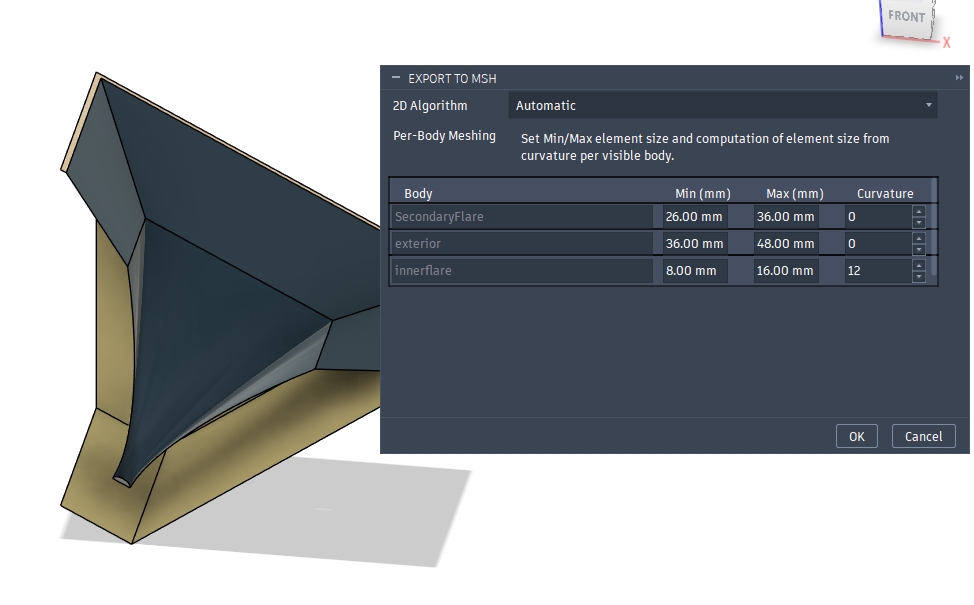
Run the MSHExport utility. Configure parameters as desired. Min/max element size can be used to set the density of the mesh. 2D algorithm should usually be left on automatic, but better results may be achieved using other algorithms depending on the mesh shape and features. The curvature parameter can be used to define varying density in the mesh that is useful for contoured surfaces.
A best practice when using this tool with AKABAK or ABEC is to export each body into separate .msh files. Doing this allows you to fine tune and optimze the density of each mesh independently for faster solve times.
Installation
Download the export utility script and unzip it into a folder
In Fusion, click the “Utilities” toolbar and click “Add-Ins”
Click the + icon and select “Script or add-in from device”
Navigate to the folder where you unzipped the export utility and select it.
Note - this add-in uses the gmsh python library. The add-in attempts to automatically install the gmsh library, but if it fails you may need to manually install it into the python environment that Fusion uses. Run the following in command prompt (adjust the path if your Fusion installation is in a non-standard location):
"%userprofile%\AppData\Local\Autodesk\webdeploy\production\<VersionID>\Python\python.exe" -m pip install gmsh